21 Travel Rule: Version 8.4.0 Released
The latest release of 21 Travel Rule, Version 8.4.0, expands self-hosted wallet verification, strengthens enterprise access controls and gives compliance teams more tools to investigate transactions.
From supporting more blockchain networks to finding the right records faster, this release helps VASPs manage daily Travel Rule operations. It also brings improvements to TRUST workflows, Microsoft 365 email authentication and deployment options for enterprise infrastructure.
21 Travel Rule 8.4.0 Updates: TL;DR
- Filter tables by asset and date, customise visible columns, search transactions by beneficiary wallet address, and access expanded customer and transaction information.
- Benefit from streamlined TRUST configuration, configurable beneficiary matching, stronger validation and counterparty checks, unified usage of TRP and TRUST via a single API, and improved protocol resilience.
- Support address ownership proofs on Optimism, Arbitrum, Avalanche and Gnosis Chain, alongside Solana ownership proofs through Phantom.
- View the requested asset and network before submitting an ownership proof, with more control over address ownership configuration.
- Enterprise users can enforce role permissions across GraphQL queries, mutations and subscriptions, with dashboard actions disabled for users without the required permissions.
- Enterprise users can review the history of transactions, wallet proofs, counterparty VASPs and other objects directly from their detail views.
- Deploy 21 Travel Rule with managed PostgreSQL and external S3 storage, restrict ingress traffic by IP address and verify signed container images.
- Connect Microsoft 365 SMTP using OAuth 2.0 authentication through Microsoft Entra credentials.
- New 21 Travel Rule branding across the Compliance Dashboard, Address Ownership Portal, Virtual Counter and login page.
- Users are notified when a newer version of 21 Travel Rule is available.
- Frankencoin (ZCHF) is now recognised as an asset within 21 Travel Rule.
Find Relevant Records Faster
Version 8.4.0 introduces several improvements to the Compliance Dashboard, giving compliance teams greater control over how transaction and customer information is viewed and managed.
The Compliance Dashboard now lets teams filter tables by asset and date interval and see how many results match. Columns can also be hidden to suit each user's workflow, with preferences preserved across page reloads.

Transaction search now includes beneficiary wallet addresses, providing another way to locate relevant transactions.
Address Book detail views now bring all of a customer's asset accounts together, giving compliance teams a more complete overview of customer activity and associated assets.
Asset tokens also indicate their base chain, making tokens operating on different networks easier to distinguish.

Smarter TRUST Workflows
Incoming TRUST requests now match the beneficiary's name against the registered customer. Compliance teams can configure the matching rules in the dashboard to reflect their firm's requirements.
Transactions to a recipient identified by a wallet address can now be initiated via a unified interface. The system will automatically select the TRP or TRUST or TRUST protocol as required. TRUST setup also obtains the VASP's legal name from the bulletin board, validates access before saving settings and creates a TRP configuration when none exists. Requests for personal information recheck the counterparty's trust status before proceeding.
Expanded Address Ownership Portal Support
The Address Ownership Portal has been expanded to support additional blockchain networks and wallets.
Address ownership proofs now support:
- Optimism
- Arbitrum
- Avalanche
- Gnosis Chain

Phantom can also now be used to sign Solana ownership proofs, extending self-hosted wallet verification to Solana users.
The portal now clearly displays the requested asset and its network before a proof is submitted. This gives users greater context during the verification process and helps reduce the risk of signing a proof for the wrong asset or network.
Stronger Enterprise Access Controls and Audit History
Version 8.4.0 strengthens access controls for enterprise deployments.
Enterprise deployments now enforce role permissions across GraphQL queries, mutations and subscriptions. The Compliance Dashboard also disables actions for users who do not have the required role, helping firms manage who can view data and make changes.
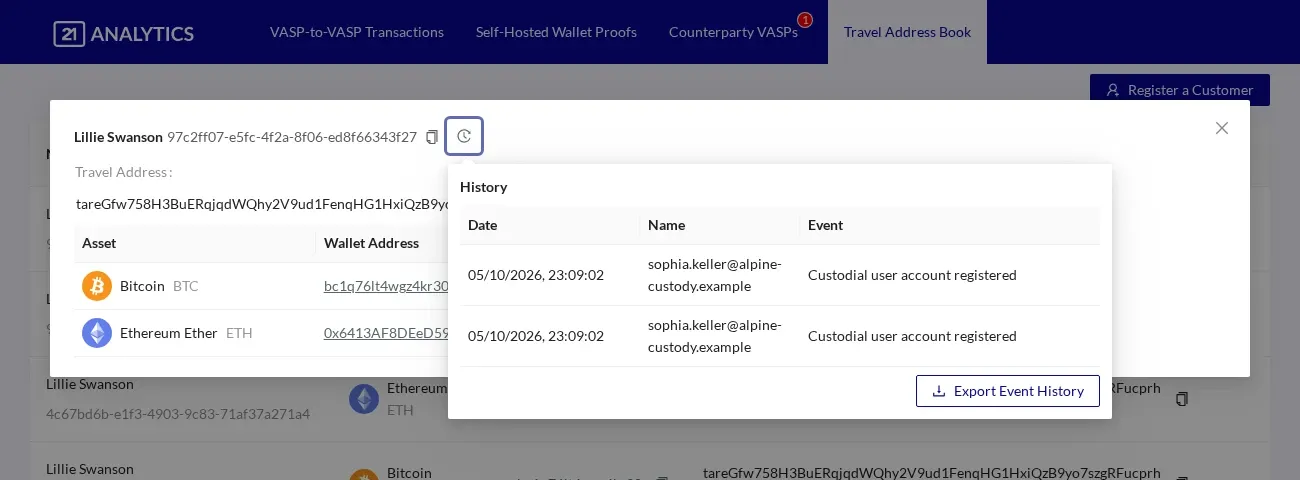
New history views show the events associated with transactions, wallet proofs and counterparty VASPs directly alongside their details. This gives enterprise compliance teams more context when reviewing a record during an investigation or audit.
More Flexible Enterprise Infrastructure
Version 8.4.0 introduces additional deployment options for enterprise infrastructure.
VASPs can now deploy 21 Travel Rule with managed PostgreSQL and external S3 storage, giving infrastructure teams more flexibility to use their existing services and operational tools.
HAProxy supports an IP allowlist for restricting ingress traffic to approved addresses. Published container images are now signed with cosign, allowing deployment teams to verify their signatures.
Email Improvements
Microsoft 365 SMTP configurations can now authenticate using OAuth 2.0, providing an additional authentication option for organisations using Microsoft 365.
Firms can configure their Microsoft Entra credentials directly in the Compliance Dashboard to connect their Microsoft 365 email service using modern authentication.
Further Improvements
Version 8.4.0 also includes a refreshed colour theme and branding across the Compliance Dashboard and Address Ownership Portal.
Frankencoin (ZCHF) is also now recognised as an asset within 21 Travel Rule.

Together with version notifications, expanded asset recognition and the other improvements introduced in this release, these updates provide greater flexibility and control across 21 Travel Rule deployments.
Read the 8.4.0 release notes for more detail.
See how 21 Travel Rule can support your compliance workflows. Get in touch with the team for a demo.
Disclaimer
This material is provided for educational and informational purposes only and is not intended to be a substitute for professional advice or detailed research.